Disaster Recovery for Self-Hosted Infrastructure
🇩🇪 Auf Deutsch lesen~7 min read
DevOpsdisaster-recoverybackupresticborgpostgresqlself-hostingresilience
Back openDesk Edu for a sovereign, open-source education — every vote counts.
Vote nowSave products you love by clicking the heart icon.
Comprehensive DR testing and edge-specific patterns for k3s — failover validation, scheduled snapshots, multi-cluster recovery, and RPO/RTO planning.
If you self-host, you are your own cloud provider. No SLA, no region failover, no support ticket to open at 3 AM. The upside is full control. The downside: when it breaks, it's on you.
Digital sovereignty doesn't mean owning your data — it means being able to get it back.
Before talking tools, define your failure modes:
| Scenario | Likelihood | Impact | Recovery Target |
|---|---|---|---|
| Filesystem corruption | Low | High — full rebuild | 4-8 hours |
Accidental deletion (rm -rf /) | Medium | High — data loss | 1-4 hours |
| Ransomware / crypto locker | Medium | Critical | no pay, only restore |
| Hardware failure (SSD death) | Low | High — replace + restore | 4-24 hours |
| Software bug corrupts DB | Medium | High — point-in-time recovery | minutes |
| Building fire / theft | Very low | Critical | off-site backup required |
Your backup strategy should address all of these. Not with the same tool, but with a layered approach.
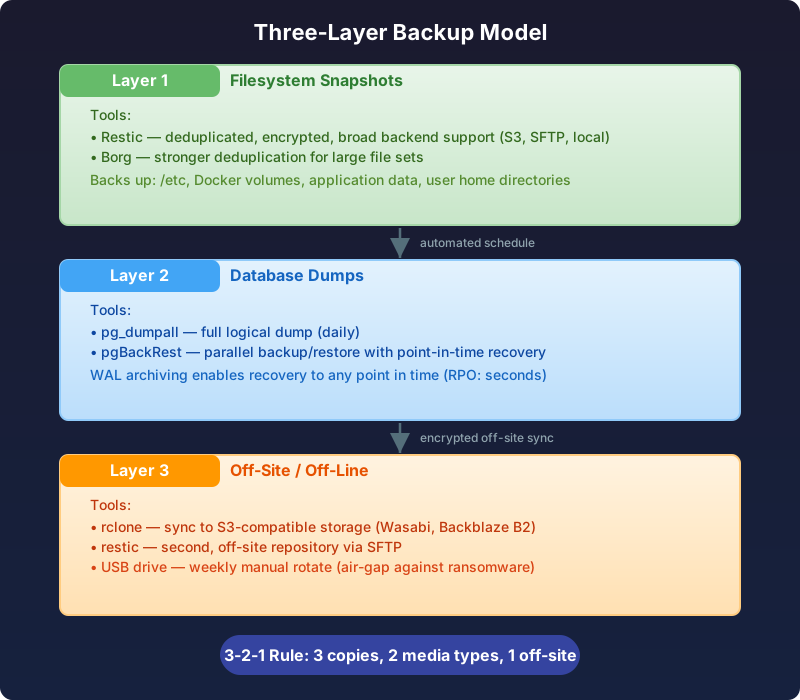
For general file backup — configs, application data, user home directories — Restic or Borg are the modern standard. They provide:
restic init --repo s3:https://s3.eu-central-1.wasabisys.com/my-backup/bucket

# Backup /etc, /var/lib, and application data
restic backup /etc /var/lib/docker/volumes \
  --repo s3:... \
  --password-file /etc/restic/pw \
  --tag monthly-$(date +%Y-%m)
Borg offers stronger deduplication for large file sets; Restic has broader backend support (S3, SFTP, local, REST server). Pick Restic if you want cloud object storage, Borg if you're backing up to a local NAS or remote server.
File-level backup of a database directory is risky — you capture corruption, partial writes, and inconsistent states. Always use the database's native dump tool.
# PostgreSQL: daily full + continuous WAL archiving
pg_dumpall -f /backup/postgres/daily-$(date +%Y-%m-%d).sql

# Or better: pgBackRest for point-in-time recovery
pgbackrest --stanza=main --type=full backup
pgbackrest --stanza=main --type=archived --set=weekly-full backup
For PostgreSQL in production:
# Restore to a specific timestamp
pgbackrest --stanza=main --type=time \
  --target="2026-07-10 14:30:00+02" restore
Ransomware that encrypts your server will encrypt your attached backup drive too. Layer 3 breaks that chain.
rclone or restic with a different remote.# Restic to a second, off-site repository
restic backup /data \
--repo sftp://backup-host:/srv/restic-repo \
--password-file /etc/restic/pw-alt
A schedule that works for most self-hosted setups:
| Frequency | What | Tool |
|---|---|---|
| Every 6 hours | File snapshots (critical paths) | Borg / Restic |
| Every 12 hours | PostgreSQL WAL archive | pgBackRest |
| Daily | Full DB dump + file snapshot | pg_dumpall + restic |
| Weekly | Full pgBackRest backup + off-site sync | pgbackrest + rclone |
| Monthly | Full backup to disconnected media | Manual rotate |
Automate with systemd timers or a cron-like tool:
# /etc/systemd/system/restic-backup.service
[Service]
Type=oneshot
ExecStart=/usr/local/bin/restic-backup.sh
Nice=19
IOSchedulingClass=idle

# /etc/systemd/system/restic-backup.timer
[Timer]
OnCalendar=*-*-* 02,10,18,22:00:00
RandomizedDelaySec=600
Persistent=true
rm -rf / on the Docker data directory# 1. Stop all containers to prevent writes
docker stop $(docker ps -q)
# 2. Restore /var/lib/docker/volumes from Restic
restic restore latest \
--path /var/lib/docker/volumes \
--target / \
--repo s3:...
# 3. Verify database integrity
docker exec db pgbackrest --stanza=main check
# 4. Start services and validate
docker start $(docker ps -aq)
# 1. Stop the database container
docker stop postgres

# 2. Restore from pgBackRest to a point before the upgrade
pgbackrest --stanza=main --type=time \
  --target="2026-07-09 03:00:00+02" restore

# 3. Start and verify
docker start postgres
psql -c "SELECT count(*) FROM pg_catalog.pg_tables;"
This should take < 4 hours for a medium setup.
This site runs on a single-node Docker swarm with the following stack. Here's the actual backup posture for production:
| Service | Data | Backup Method | RPO | RTO |
|---|---|---|---|---|
| PostgreSQL | Blog, auth, store orders | pg_dumpall + WAL archiving | 6 hours | 1 hour |
| MinIO | User uploads, media assets | Restic → off-site (Wasabi S3) | 12 hours | 2 hours |
| listmonk | Mailing lists, campaigns | pg_dump (embedded Postgres) | 24 hours | 4 hours |
| n8n | Automation workflows | Volume backup + export JSON | 12 hours | 1 hour |
| Ollama / vLLM | AI model weights | Re-pull from registry | N/A (ephem) | 30 min |
| Next.js (this) | Static build + content | Git (source) + Restic (build) | 24 hours | 30 min |
| Grafana / Loki | Dashboards + logs | Dashboard JSON export + S3 | 24 hours | 4 hours |
| Traefik | TLS certs, routing config | Volume backup + Let's Encrypt | 24 hours | 15 min |
Critical distinction: docker-compose.yml and all .env files live in a private git repo. Losing the server without this repo means rebuilding from memory. Keep your config repo backed up independently.
#!/bin/bash
# /usr/local/bin/daily-backup.sh - runs via systemd timer at 03:00 daily
set -euo pipefail

BACKUP_DIR="/backup/$(date +%Y-%m-%d)"
RESTIC_REPO="s3:https://s3.eu-central-1.wasabisys.com/tobias-backup"
RESTIC_PW="/etc/restic/pw"

mkdir -p "$BACKUP_DIR"

# 1. Dump PostgreSQL
docker exec postgres pg_dumpall -U postgres > "$BACKUP_DIR/postgres-full.sql"

# 2. Export n8n workflows
docker exec n8n n8n export:workflow --all --output=/backup/n8n-workflows

# 3. Backup Docker volumes via Restic
restic backup /var/lib/docker/volumes \
  --repo "$RESTIC_REPO" \
  --password-file "$RESTIC_PW" \
  --tag "$(hostname)-daily-$(date +%Y-%m-%d)" \
  --exclude '*/postgres/data/*'   # excluded — we have SQL dump

# 4. Notify healthchecks
curl -fsS -m 10 --retry 3 "https://hc-ping.com/YOUR-UUID"
## Emergency Recovery: Complete Server Loss

**Target recovery time: 4 hours**

### Phase 1: Infrastructure (30 min)

- [ ] Provision new VPS / bare metal (Intel/AMD, 32GB+ RAM, NVMe)
- [ ] Install Docker + Docker Compose plugin
- [ ] Clone config repo: `git clone git@codeberg:user/server-config`
- [ ] Restore `.env` files from 1Password / Bitwarden

### Phase 2: Restore Data (1 hour)

- [ ] Mount S3 bucket with Restic key
- [ ] `restic restore latest --target / --repo s3:...`
- [ ] Verify volume checksums

### Phase 3: Databases (30 min)

- [ ] Start PostgreSQL container without data dir
- [ ] `pg_restore -U postgres -d postgres /backup/postgres-full.sql`
- [ ] Verify: `docker exec postgres psql -c "SELECT count(*) FROM users;"`

### Phase 4: Services (1 hour)

- [ ] `docker compose up -d` — verify all services healthy
- [ ] Check Traefik dashboard: TLS certs issued?
- [ ] Log into store: transaction history intact?
- [ ] Check listmonk: campaign lists loaded?

### Phase 5: Verification (30 min)

- [ ] curl -I https://tobias-weiss.org — returns 200
- [ ] Run a test Stripe checkout through to redirect
- [ ] Monitor logs: no ERROR entries in first 15 minutes
- [ ] Update DR log: date, actual time, issues encountered
Schedule a 2-hour slot every quarter. The drill:
Each quarter you don't test, you're accumulating risk. This is not theoretical — a silent Postgres upgrade or an expired S3 credential will only reveal itself during a drill or an actual disaster.
A backup you never test is a disaster waiting to happen. Schedule a quarterly DR drill:
# Quick integrity check between backups
restic check --repo s3:... --password-file /etc/restic/pw
pgbackrest --stanza=main check
Don't rely on "it ran silently." For a deeper look at how production monitoring works across the full stack, see Production Observability Stack and Grafana Dashboards. Monitor your backups:
ERROR in backup logs.mail -s "Backup failed" in the error path. Better than nothing.# Prepend to your backup script
trap 'curl -fsS -m 10 --retry 5 \
https://hc-ping.com/YOUR-UUID/fail' ERR
curl -fsS -m 10 --retry 5 \
https://hc-ping.com/YOUR-UUID/start
| Principle | Implementation |
|---|---|
| Automate everything | systemd timers + restic/pgBackRest |
| Encrypt before sending | Restic client-side encryption |
| 3-2-1 rule | Local + off-site + periodic offline |
| Test your restore | Quarterly DR drill |
| Monitor success | Healthchecks.io / Prometheus |
| Document the playbook | Runbook in your git repo |
Self-hosting means accepting responsibility. A proper DR plan converts a "drop everything and panic" event into a "follow the runbook" procedure. That's the difference between operators and victims.