SCS OSISM Deployment Networking: VIPs, Network Separation, and Multi-Node Architecture
~11 min read
DevOpsCloud Infrastructurescsosismnetworkingvipkeepalivedhaproxyopenstackovndigital-sovereigntysovereign-cloud-stack
Save products you love by clicking the heart icon.
GLM-5.3's emergent cyber capabilities and OpenAI's GPT-5.6-Cyber signal a shift in AI-assisted vulnerability research. Here's what it means for defensive teams, the guardrails that matter, and why graph-based attack surface mapping is the next frontier.
Essential reference for socat — the bidirectional data relay Swiss-army knife for TCP, UDP, UNIX sockets, SSL/TLS, PTY, file, and proxy connections.
The Sovereign Cloud Stack (SCS) provides Europe's open-source cloud infrastructure framework. Its deployment engine, OSISM, manages everything from bare metal provisioning to OpenStack, Ceph, and Kubernetes orchestration. While the Cloud in a Box guide covers single-node deployments, production SCS environments require multiple nodes with proper network segmentation, high-availability Virtual IPs (VIPs), and software-defined networking.
This guide focuses specifically on the networking layer of an OSISM-managed SCS deployment — the network zones, VIP architecture, interface roles, and configuration patterns that make a multi-node cloud operational.
An OSISM cloud pod consists of several node roles, each connected to specific network zones:
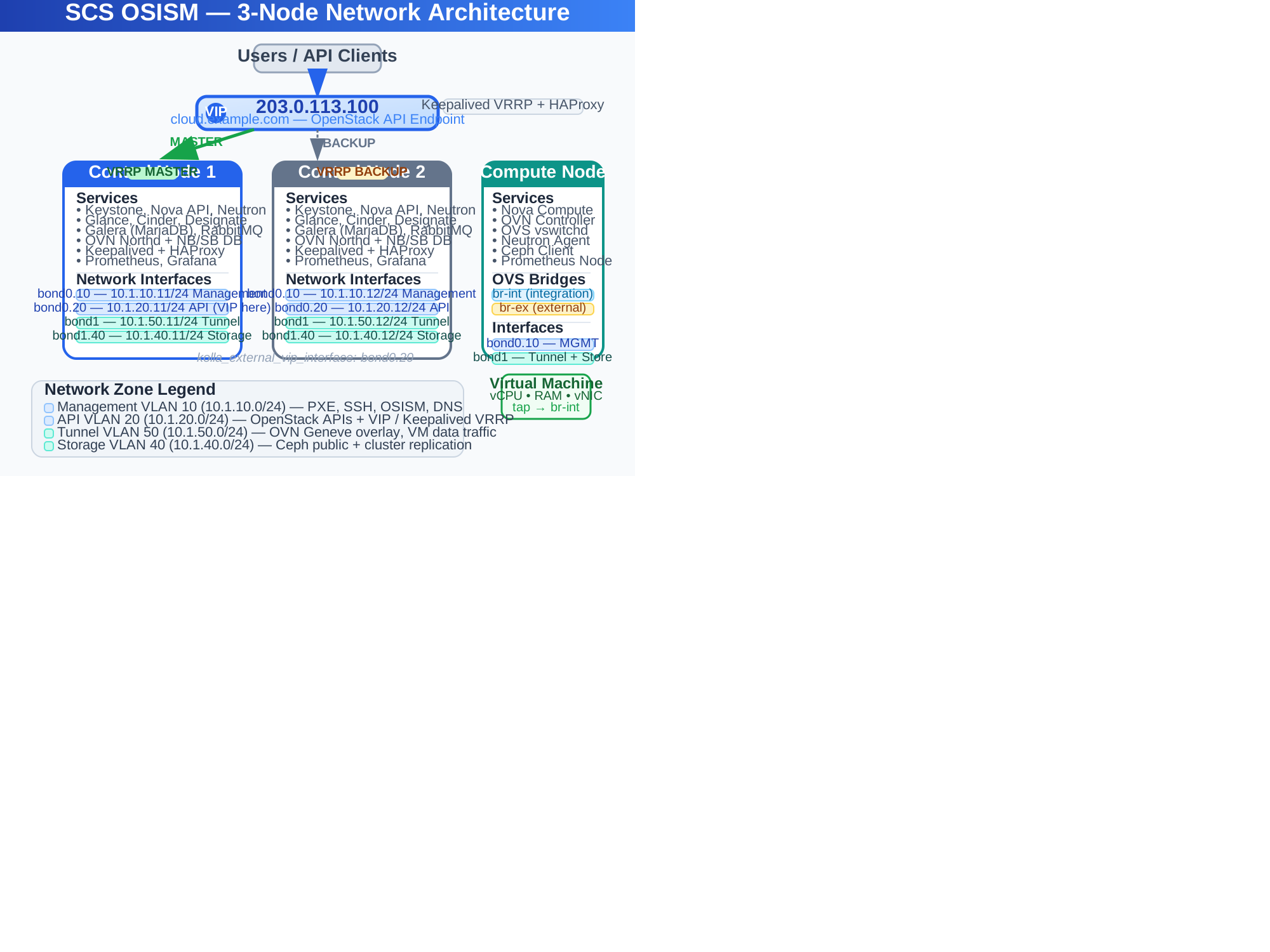
OSISM defines up to six logical network zones. In a production deployment, each maps to a distinct VLAN and physical interface or LAG:
| Zone | Default Interface | Purpose | Typical Speed |
|---|---|---|---|
| Management | eth0 / network_interface | Node provisioning, SSH, OSISM Ansible, DNS | 1 Gbit |
| API | api_interface | OpenStack API endpoints (Keystone, Nova, Neutron, etc.) | 10–25 Gbit |
| Tunnel | tunnel_interface | OVN/OVS overlay traffic (VXLAN/Geneve encap) | 25–100 Gbit |
| Storage | storage_interface | Ceph public & cluster replication network | 25–100 Gbit |
| External | neutron_external_interface | Provider/physical network for floating IPs, routers | 10–25 Gbit |
| Migration | migration_interface | Live migration of running VMs | 10–25 Gbit |
In smaller deployments, some zones can be collapsed — API and management may share a 10 Gbit interface, or tunnel and storage may share a high-speed link with QoS tagging. The OSISM Bill of Materials recommendation for production is:
OSISM maps traffic types to named interface roles in environments/kolla/configuration.yml. Each role resolves to either a physical interface, a VLAN sub-interface, or a bond.
| Parameter | Default | Recommended for Production |
|---|---|---|
network_interface | eth0 | bond0.10 (management VLAN) |
api_interface | {{ network_interface }} | bond0.20 (API VLAN) |
kolla_external_vip_interface | {{ network_interface }} | bond0.20 (same as API) |
tunnel_interface | {{ network_interface }} | bond1 (dedicated data plane bond) |
migration_interface | {{ api_interface }} | bond0.30 (migration VLAN) |
neutron_external_interface | {{ network_interface }} | bond2 (dedicated external bond on network nodes) |
storage_interface | (varies) | bond1.40 (storage VLAN on same bond) |
A production control node with three physical NICs might use:
network_interface: "bond0"
api_interface: "bond0"
tunnel_interface: "bond1"
migration_interface: "bond0"
neutron_external_interface: "bond2"
kolla_external_vip_interface: "bond0"
With Netplan under Ubuntu 24.04:
# /etc/netplan/01-osism.yaml
network:
  version: 2
  renderer: networkd
  bonds:
    bond0:
      interfaces: [enp1s0f0, enp1s0f1]
      parameters:
        mode: 802.3ad
        mtu: 1500
    bond1:
      interfaces: [enp2s0f0, enp2s0f1]
      parameters:
        mode: 802.3ad
        mtu: 9000
  vlans:
    vlan10:
      id: 10
      link: bond0
      mtu: 1500
      addresses: ["10.1.10.10/24"]
    vlan20:
      id: 20
      link: bond0
      mtu: 1500
      addresses: ["10.1.20.10/24"]
    vlan30:
      id: 30
      link: bond0
      mtu: 1500
      addresses: ["10.1.30.10/24"]
  ethernets:
    bond2:
      mtu: 1500
      addresses: [] # No IP — bridged to OVS br-ex
This gives you 3 bonds on 6 physical ports: a management bond for MGMT/API/migration VLANs, a high-speed bond for tunnel/storage with jumbo frames, and a dedicated bond for external provider network bridging.
The single most important networking concept in a multi-node OSISM deployment is the Virtual IP (VIP). Without it, every OpenStack API call would need to know which control node is currently alive. The VIP provides a single, floating endpoint that follows the active controller.
kolla_external_vip_addressAll OpenStack API services (Keystone, Nova API, Neutron API, Glance, Cinder, Heat, Designate, etc.) are fronted by a single VIP defined as:
# environments/kolla/configuration.yml
kolla_external_vip_address: "203.0.113.100"
kolla_external_fqdn: "cloud.example.com"
This IP address is not assigned to any single host permanently. It floats between the three control nodes via Keepalived running inside Docker containers managed by Kolla-Ansible.
The flow is:
203.0.113.100) on the kolla_external_vip_interfaceYou do not configure Keepalived directly — Kolla-Ansible generates the configuration from variables. The relevant parameters for fine-tuning are:
# environments/kolla/configuration.yml
keepalived_virtual_router_id: 51 # Unique per VLAN (1-255)
kolla_keepalived_vrrp_priority: 100 # Higher = more likely to be master
kolla_external_vip_interface: "bond0.20" # Interface the VIP lives on
kolla_external_vip_address: "203.0.113.100"
The generated Keepalived config on each control node looks like:
vrrp_instance kolla_internal {
  interface bond0.20
  virtual_router_id 51
  priority 100        # (101 on preferred master, 100 on backups)
  advert_int 1
  authentication {
    auth_type PASS
    auth_pass kolla
  }
  virtual_ipaddress {
    203.0.113.100/24 dev bond0.20
  }
}
All of these OpenStack services are reached through the same VIP. HAProxy routes them by port:
| Service | Port | Backend Nodes |
|---|---|---|
| Keystone (public) | 5000 | All control |
| Keystone (admin) | 35357 | All control |
| Nova API | 8774 | All control |
| Neutron API | 9696 | All control |
| Glance API | 9292 | All control |
| Cinder API | 8776 | All control |
| Designate API | 9001 | All control |
| Heat API | 8004 | All control |
| Horizon (dashboard) | 80/443 | All control |
In addition to the Kolla-managed VIP, OSISM deployments can use anycast VIPs for the OVN network agent. The ovn-network-agent watches OVN databases and synchronizes floating IP routes. It can optionally announce these routes via anycast VIPs on compute or network nodes, enabling:
This is configured per-node:
ovn_network_agent:
  anycast_vip: "203.0.113.200/32"
  anycast_interface: "lo"
A minimum viable production OSISM cluster uses:
All nodes connect to:
| VLAN | Purpose | Subnet Example | Nodes |
|---|---|---|---|
| 10 | Management | 10.1.10.0/24 | All |
| 20 | API | 10.1.20.0/24 | Control + Network |
| 30 | Migration | 10.1.30.0/24 | All (hypervisors) |
| 40 | Storage (public) | 10.1.40.0/24 | Storage + Compute |
| 41 | Storage (cluster) | 10.1.41.0/24 | Storage only |
| 50 | Tunnel (OVN) | 10.1.50.0/24 | All (compute + network) |
| 100 | External provider | 203.0.113.0/24 | Network nodes only |
The network layout is declared in the inventory's group variables:
# inventory/group_vars/generic/network.yml
network_type: netplan
network_ethernets:
  bond0:
    mtu: 1500
    interfaces: [enp1s0f0, enp1s0f1]
    parameters:
      mode: 802.3ad
      lacp-rate: fast
network_vlans:
  management:
    id: 10
    link: bond0
    addresses:
      - "10.1.10.{{ node_suffix }}/24"
    gateway4: "10.1.10.1"
  api:
    id: 20
    link: bond0
    addresses:
      - "10.1.20.{{ node_suffix }}/24"
  migration:
    id: 30
    link: bond0
    addresses:
      - "10.1.30.{{ node_suffix }}/24"
The node_suffix is derived from the last octet of the BMC IP address, giving each host a predictable IP in every VLAN without manual assignment.
Understanding the network path during initial deployment helps debug connectivity issues.
The Seed node runs DHCP, TFTP, PXE/iPXE, and a local APT/container registry:
The target node gets an IP on the management VLAN from the Seed's DHCP.
Once the Manager node is online, it takes over orchestration. The Seed is no longer needed after this phase.
With networking configured, services are deployed per role:
# On the Manager node:
osism apply openvswitch -l control1,control2,control3
osism apply ovn -l control1,control2,control3
osism apply neutron -l control1,control2,control3
osism apply nova -l compute1,compute2,compute3
osism apply ceph -l storage1,storage2,storage3
After all services are running, Kolla-Ansible deploys Keepalived and HAProxy:
osism apply kolla -l control1,control2,control3
The VIP appears on the elected master. Verify with:
# On the master controller
ip addr show bond0.20 | grep 203.0.113.100

# From any management host
curl -k https://203.0.113.100:5000/v3
OSISM uses OVN (Open Virtual Network) as its SDN controller, with Open vSwitch on each hypervisor.
| Component | Role | Location |
|---|---|---|
ovn-northd | Translates Neutron API calls into OVN logical flows | Control nodes |
ovn-sb-db | Southbound database (logical flow state) | Control nodes (RAFT) |
ovn-nb-db | Northbound database (desired state) | Control nodes (RAFT) |
ovn-controller | Local OpenFlow programming on each hypervisor | All compute + network nodes |
ovs-vswitchd | Open vSwitch datapath forwarding | All compute + network nodes |
Each hypervisor (compute or network node) has:
br-int: Integration bridge — all VM ports, router ports, and tunnel endpoints connect herebr-ex: External bridge — maps to neutron_external_interface for provider networksbr-add: Additional external bridge for a second provider physical network# environments/kolla/configuration.yml
neutron_plugin_type: "ovn"
ovn_ovs_bridge_mappings: "physnet1:br-ex,physnet2:br-add"
neutron_bridge_name: "br-ex,br-add"
network_workload_interface: "vlan101,"
The network_workload_interface parameter connects OVS bridges to physical interfaces. The comma-separated format maps to bridge names positionally: vlan101 maps to br-ex, empty maps to br-add.
Creating an external (provider) network that tenants can use for floating IPs:
# environments/openstack/configuration.yml
network_external_name: "public"
network_external_provider_network_type: "flat"
network_external_provider_physical_network: "physnet1"
network_external_cidr: "203.0.113.0/24"
network_external_gateway_ip: "203.0.113.1"
network_external_allocation_pool_start: "203.0.113.100"
network_external_allocation_pool_end: "203.0.113.200"
network_external_dns_nameservers:
  - "8.8.8.8"
  - "9.9.9.9"
Apply:
osism apply network-external
This creates a Neutron network named public with a flat (untagged) provider segment on physnet1, available to all projects.
For VLAN-backed provider networks, use provider_network_type: "vlan" and set provider_segmentation_id to the desired VLAN ID. For Geneve tenant networks (the default in OVN), no explicit creation is needed — Neutron creates them on demand.
Keepalived VRRP requires at least two nodes for failover, but three provides true quorum. With two nodes, a split-brain scenario (network partition) can result in both nodes claiming the VIP. With three, the RAFT consensus used by OVN databases and Galera also requires a majority (2 of 3).
Ceph is sensitive to latency and packet loss. Always put Ceph replication on a dedicated VLAN with:
The entire data path must support the same MTU. If you use jumbo frames (9000) on the storage network, ensure all switches, routers, and NICs in that path are configured for MTU 9000. Mismatched MTU causes packet drops that are extremely difficult to debug (silent drops on fragmented packets).
Create DNS A/AAAA records pointing to each VIP before deployment:
| Record | Value | Purpose |
|---|---|---|
cloud.example.com | 203.0.113.100 | Primary OpenStack endpoint |
registry.example.com | 203.0.113.101 | Internal container registry |
netbox.example.com | 203.0.113.102 | NetBox DCIM |
OSISM and Kolla-Ansible generate self-signed certificates for these FQDNs during deployment.
Apply ACLs at the leaf switches to restrict inter-VLAN traffic:
| Source | Destination | Ports | Reason |
|---|---|---|---|
| Management | All | SSH (22), SNMP (161) | Node access |
| API | Control | 5000, 8774, 9696, ... | OpenStack APIs |
| Storage | Storage | 6789, 3300, 6800-7300 | Ceph daemons |
| Tunnel | All | 6081 (Geneve), 4789 (VXLAN) | Overlay traffic |
Keepalived provides a track_script mechanism that can monitor HAProxy's health. If HAProxy dies on the master, Keepalived should trigger failover:
vrrp_script chk_haproxy {
  script "/usr/bin/pgrep haproxy"
  interval 2
  fall 2
}
This is configured automatically by Kolla-Ansible. You can verify HAProxy status on any control node:
docker exec -it haproxy haproxy -f /etc/haproxy/haproxy.cfg -c
docker exec -it keepalived keepalived --dump-conf
The Cloud in a Box guide shows how to deploy a single-node SCS environment in about two hours. That setup uses VLAN 101 internally and masquerading for external access — networking is simplified to zero configuration.
Moving to production means:
The networking architecture described here is the foundation that makes SCS a production-ready sovereign cloud platform. Every API call, every virtual machine, every storage operation flows through these network zones — getting them right is the difference between a cloud that works and a cloud that works reliably.