Self-Hosted AI Stack: Ollama, Open WebUI, and LiteLLM in Production
🇩🇪 Auf Deutsch lesen~5 min read
DevOpsAIollamaopen-webuilitellmllm-inferencedocker-composeself-hostingai-infrastructure
Back openDesk Edu for a sovereign, open-source education — every vote counts.
Vote nowSave products you love by clicking the heart icon.
Running LLMs locally is no longer a hobbyist experiment. With models like DeepSeek V4, Qwen 3.6, Llama 4, and Mistral Small 3.1 fitting on consumer GPUs, self-hosted AI has become a viable alternative to API-based services for many workloads:
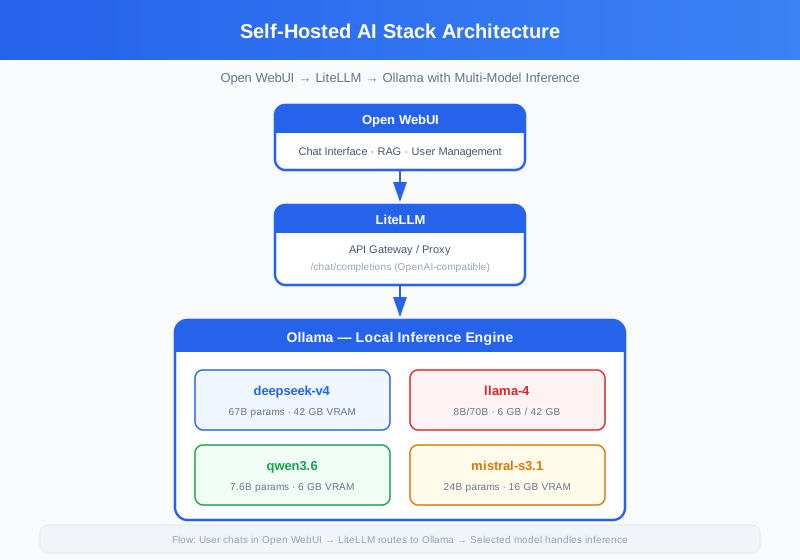
Ollama has become the standard for running LLMs locally. It handles model downloading, GPU acceleration (NVIDIA CUDA), and exposes a REST API for inference.
Key decisions:
~/.ollama/models by default. Map this to a persistent volume — downloading 70B models (40+ GB) repeatedly is painful.--num-parallel flag or use LiteLLM's routing.Model selection guide:
| Model | Parameters | VRAM | Quality | Speed (7B on 3090) |
|---|---|---|---|---|
| Qwen 3.6 | 7.6B | 6 GB | Good | ~80 tok/s |
| Mistral Small 3.1 | 24B | 16 GB | Very Good | ~40 tok/s |
| DeepSeek V4 | 67B | 42 GB | Excellent | ~15 tok/s |
| Llama 4 | 8B/70B | 6 GB / 42 GB | Good/Excellent | ~75 tok/s / ~12 tok/s |
LiteLLM provides an OpenAI-compatible API that routes to any LLM backend. This is the key architectural decision: instead of connecting Open WebUI directly to Ollama, route through LiteLLM.
Why this matters:
The config file (litellm_config.yaml) defines model groups and routing rules:
model_list:
  - model_name: fast
    litellm_params:
      model: ollama/mistral-s3.1
      api_base: http://ollama:11434
      rpm: 60

  - model_name: powerful
    litellm_params:
      model: ollama/deepseek-v4
      api_base: http://ollama:11434
      rpm: 10

  - model_name: default
    litellm_params:
      model: ollama/qwen3.6
      api_base: http://ollama:11434
Open WebUI is the most feature-complete ChatGPT alternative for self-hosted setups. It provides:
The UI connects to LiteLLM's OpenAI-compatible endpoint, so it inherits all routing and fallback behavior automatically.
| Setup | GPU | RAM (System) | Storage | Users |
|---|---|---|---|---|
| Minimum | None (CPU) | 16 GB | 20 GB | 1 |
| Recommended | RTX 3090 24GB | 32 GB | 100 GB | 1-3 |
| Team | 2× RTX 4090 24GB | 64 GB | 500 GB | 5-15 |
| Production | 4× A100 80GB | 256 GB | 2 TB | 50+ |
Without a GPU, expect 1-5 tokens/second on 7B models — usable for chat, painful for batch processing.
Don't pull every model at once. A single 70B model occupies ~40 GB of VRAM for inference plus ~40 GB of disk. Start with one small + one large model:
docker compose exec ollama ollama pull mistral-s3.1  # 16 GB disk, 24B params
docker compose exec ollama ollama pull qwen3.6        # 6 GB disk, 7.6B params

# Add when needed
# docker compose exec ollama ollama pull deepseek-v4   # 42 GB disk, 67B params
The stack exposes a UI and an API. For production:
WEBUI_SECRET_KEY and WEBUI_JWT_SECRET in Open WebUILITELLM_MASTER_KEY for API access controlLiteLLM exposes Prometheus metrics at /metrics. Add this endpoint to the Observability stack's Prometheus scrape config for: