Running n8n in Production: Docker Compose, Queue Mode, and Postgres Backend
🇩🇪 Auf Deutsch lesen~3 min read
DevOpsWorkflow Automationn8nautomationredispostgresqldocker-composeworkflow-automationproduction
Back openDesk Edu for a sovereign, open-source education — every vote counts.
Vote nowSave products you love by clicking the heart icon.
Build a complete production infrastructure with open-source tools: PostgreSQL for data, Redis for caching, MinIO for S3-compatible storage, n8n for workflow automation, Prometheus and Grafana for observability - all behind a secure reverse proxy. All components work together in a cohesive architecture.
n8n is the leading open-source workflow automation platform. At small scale, SQLite + single-process mode works fine. But once you cross ~50 active workflows or need reliability guarantees, production deployment requires:
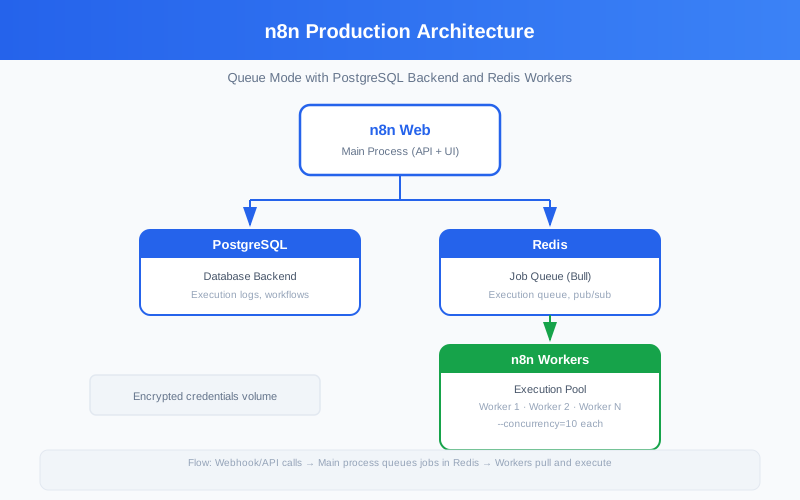
The critical configuration parameters for a production n8n deployment:
DB_TYPE=postgresdb
DB_POSTGRESDB_DATABASE=n8n
DB_POSTGRESDB_HOST=postgres
DB_POSTGRESDB_PORT=5432
DB_POSTGRESDB_USER=n8n
DB_POSTGRESDB_PASSWORD=change-me

# Queue — Redis for multi-process mode
EXECUTIONS_MODE=queue
QUEUE_BULL_REDIS_HOST=redis
QUEUE_BULL_REDIS_PORT=6379

# Encryption — MUST be set, auto-generated if missing
ENCRYPTION_KEY=your-32-char-encryption-key

# Security
N8N_METRICS=false
N8N_DIAGNOSTICS_ENABLED=false
N8N_PERSONALIZATION_ENABLED=false
N8N_HIRING_BANNER_ENABLED=false
N8N_DISABLE_PRODUCTION_MAIN_PROCESS=false
The single most important decision is execution mode:
| Mode | How It Works | Best For |
|---|---|---|
| Single (default) | All in one process | Development, <50 workflows |
| Queue (production) | Web process delegates to workers | Production, >50 workflows |
In queue mode:
n8n generates significant database load from execution logs. Tune PostgreSQL for this workload:
# Recommended postgres.conf tweaks for n8n
shared_buffers = '1GB'           # 25% of available RAM
effective_cache_size = '3GB'     # 75% of available RAM
work_mem = '64MB'                # Per-operation sort memory
maintenance_work_mem = '256MB'   # For VACUUM
wal_buffers = '16MB'
random_page_cost = 1.1           # SSD-optimized
effective_io_concurrency = 200   # SSD-optimized
n8n execution tables grow fast. A busy instance with 1000 executions/day generates ~500 MB of execution data per month. Plan storage accordingly.
Production n8n must have execution pruning configured. Without it, disk fills up within weeks:
# Automatically delete executions older than N days
EXECUTIONS_DATA_PRUNE=true
EXECUTIONS_DATA_MAX_AGE=168      # Hours (7 days)

# Optional: save only failed/saved executions, discard successful
EXECUTIONS_DATA_SAVE_ON_ERROR=all
EXECUTIONS_DATA_SAVE_ON_SUCCESS=none
EXECUTIONS_DATA_SAVE_ON_MANUAL=all
This keeps the database lean while preserving failed executions for debugging.
In queue mode, worker processes are fully stateless. Scale by adding more worker containers:
# In docker-compose.yml, multiple workers
n8n-worker-1:
  <<: *n8n-base
  command: worker --concurrency=10
  depends_on:
    - redis

n8n-worker-2:
  <<: *n8n-base
  command: worker --concurrency=10
  depends_on:
    - redis
The --concurrency flag controls how many executions each worker runs in parallel. Default is 10. Scale workers when you see Waiting for execution in logs while CPU is available.
ENCRYPTION_KEY to a 32-character random string (use openssl rand -hex 16)EXECUTIONS_DATA_PRUNE — default is OFF, which fills diskN8N_ENCRYPTION_KEY as a Docker secret, not an env var in plaintext~/.n8n as a persistent volume for encryption keys/healthz returns 200 when ready:latestENCRYPTION_KEY — keep this safe