Self-Hosted AI Stack: Ollama, Open WebUI und LiteLLM in der Produktion
🇬🇧 Read in English~5 min read
DevOpsAIollamaopen-webuilitellmllm-inferencedocker-composeself-hostingai-infrastructure
Back openDesk Edu for a sovereign, open-source education — every vote counts.
Vote nowSave products you love by clicking the heart icon.
Build a complete production infrastructure with open-source tools: PostgreSQL for data, Redis for caching, MinIO for S3-compatible storage, n8n for workflow automation, Prometheus and Grafana for observability - all behind a secure reverse proxy. All components work together in a cohesive architecture.
Das lokale Ausführen von LLMs ist kein Hobby-Experiment mehr. Da Modelle wie DeepSeek V4, Qwen 3.6, Llama 4 und Mistral Small 3.1 auf Consumer-GPUs Platz finden, ist self-hosted AI für viele Workloads zu einer viable Alternative zu API-basierten Diensten geworden:
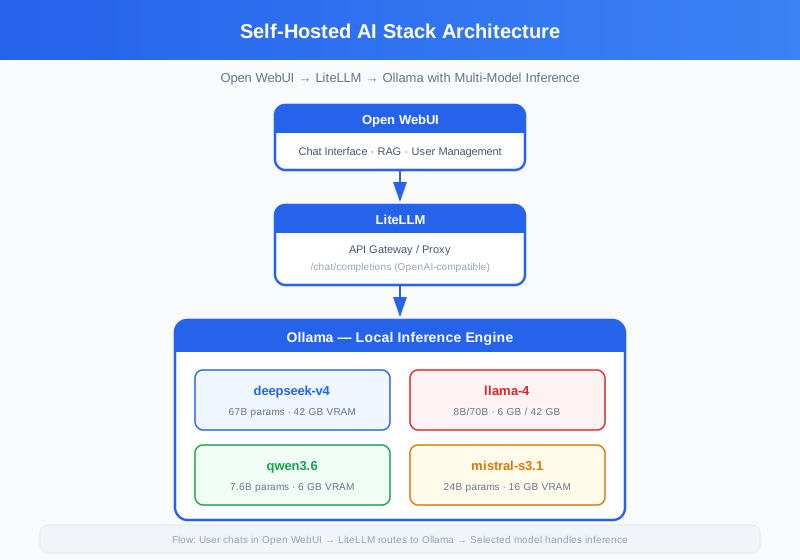
Ollama hat sich zum Standard für das lokale Ausführen von LLMs entwickelt. Es übernimmt den Modell-Download, die GPU-Beschleunigung (NVIDIA CUDA) und stellt eine REST-API für die Inference bereit.
Wichtige Entscheidungen:
~/.ollama/models. Mappen Sie dies auf ein persistent Volume – das wiederholte Herunterladen von 70B-Modellen (40+ GB) ist mühsam.--num-parallel Flag oder nutzen Sie das Routing von LiteLLM.Leitfaden zur Modellwahl:
| Modell | Parameter | VRAM | Qualität | Geschwindigkeit (7B auf 3090) |
|---|---|---|---|---|
| Qwen 3.6 | 7.6B | 6 GB | Gut | ~80 tok/s |
| Mistral Small 3.1 | 24B | 16 GB | Sehr Gut | ~40 tok/s |
| DeepSeek V4 | 67B | 42 GB | Exzellent | ~15 tok/s |
| Llama 4 | 8B/70B | 6 GB / 42 GB | Gut/Exzellent | ~75 tok/s / ~12 tok/s |
LiteLLM bietet eine OpenAI-kompatible API, die an jedes LLM-Backend routet. Dies ist die zentrale architektonische Entscheidung: Verbinden Sie Open WebUI nicht direkt mit Ollama, sondern routen Sie über LiteLLM.
Warum das wichtig ist:
Die Konfigurationsdatei (litellm_config.yaml) definiert Modellgruppen und Routing-Regeln:
model_list:
  - model_name: fast
    litellm_params:
      model: ollama/mistral-s3.1
      api_base: http://ollama:11434
      rpm: 60

  - model_name: powerful
    litellm_params:
      model: ollama/deepseek-v4
      api_base: http://ollama:11434
      rpm: 10

  - model_name: default
    litellm_params:
      model: ollama/qwen3.6
      api_base: http://ollama:11434
Open WebUI ist die funktionsreichste ChatGPT-Alternative für self-hosted Setups. Es bietet:
Die UI verbindet sich mit dem OpenAI-kompatiblen Endpunkt von LiteLLM und übernimmt so automatisch alle Routing- und Fallback-Verhaltensweisen.
| Setup | GPU | RAM (System) | Speicher | Benutzer |
|---|---|---|---|---|
| Minimum | Keine (CPU) | 16 GB | 20 GB | 1 |
| Empfohlen | RTX 3090 24GB | 32 GB | 100 GB | 1-3 |
| Team | 2× RTX 4090 24GB | 64 GB | 500 GB | 5-15 |
| Produktion | 4× A100 80GB | 256 GB | 2 TB | 50+ |
Ohne GPU ist mit 1-5 Tokens/Sekunde bei 7B-Modellen zu rechnen – nutzbar für Chat, mühsam für Batch-Processing.
Laden Sie nicht alle Modelle gleichzeitig. Ein einzelnes 70B-Modell belegt ~40 GB VRAM für die Inference plus ~40 GB Festplattenspeicher. Beginnen Sie mit einem kleinen und einem großen Modell:
docker compose exec ollama ollama pull mistral-s3.1  # 16 GB disk, 24B params
docker compose exec ollama ollama pull qwen3.6        # 6 GB disk, 7.6B params

# Add when needed
# docker compose exec ollama ollama pull deepseek-v4   # 42 GB disk, 67B params
Der Stack exponiert eine UI und eine API. Für die Produktion:
WEBUI_SECRET_KEY und WEBUI_JWT_SECRET in Open WebUILITELLM_MASTER_KEY für die API-ZugriffskontrolleLiteLLM stellt Prometheus-Metriken unter /metrics bereit. Fügen Sie diesen Endpunkt zur Prometheus-Scrape-Konfiguration Ihres Observability-Stacks hinzu für: